
This content is for v3.x (Discontinued). Switch to the Stable version.
Area
Add chart method present in slide component or you can replace the chart using shape component.
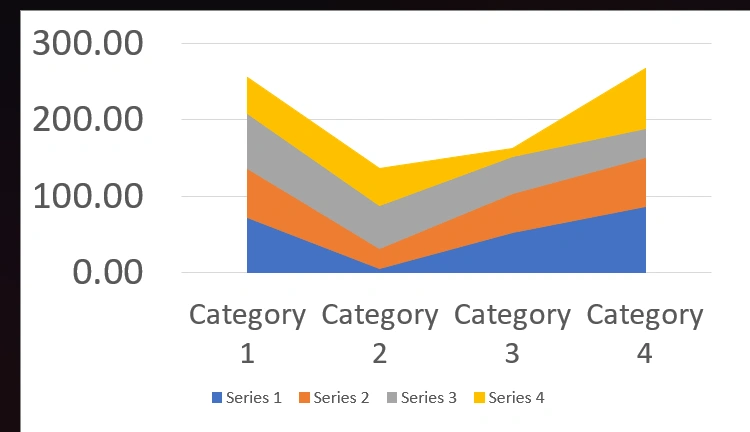
Basic Code Sample
Section titled “Basic Code Sample”using G = OpenXMLOffice.Global_2007;
// Bare minimumpowerPoint.AddSlide(PresentationConstants.SlideLayoutType.BLANK) .AddChart(CreateDataCellPayload(), new G.AreaChartSetting<G.PresentationSetting>());// Some additional samplespowerPoint.AddSlide(PresentationConstants.SlideLayoutType.BLANK) .AddChart(CreateDataCellPayload(), new G.AreaChartSetting<G.PresentationSetting>() { areaChartTypes = G.AreaChartTypes.STACKED, chartAxesOptions = new() { horizontalFontSize = 20, verticalFontSize = 25 } });AreaChartSetting<G.PresentationSetting> Options
Section titled “AreaChartSetting<G.PresentationSetting> Options”Contains options details extended from ChartSetting that are specific to area chart.
| Property | Type | Details |
|---|---|---|
| areaChartDataLabel | AreaChartDataLabel | General Data label option applied for all series |
| areaChartSeriesSettings | List<AreaChartSeriesSetting?> | Data Series specific options are used from the list. The position on the list is matched with the data series position. you can use null to skip a series |
| areaChartTypes | AreaChartTypes | Type of chart |
| chartAxesOptions | ChartAxesOptions | Chart axes options |
AreaChartDataLabel Options
Section titled “AreaChartDataLabel Options”Contains options details extended from ChartDataLabel that are specific to area chart.
| Property | Type | Details |
|---|---|---|
| dataLabelPosition | DataLabelPositionValues | Data Label placement options. |
AreaChartSeriesSetting Options
Section titled “AreaChartSeriesSetting Options”Contains options details extended from ChartSeriesSetting that are specific to area chart.
| areaChartDataLabel | AreaChartDataLabel | Data Label Option specific to one series |
| fillColor | string? | Fill color specific to one series |